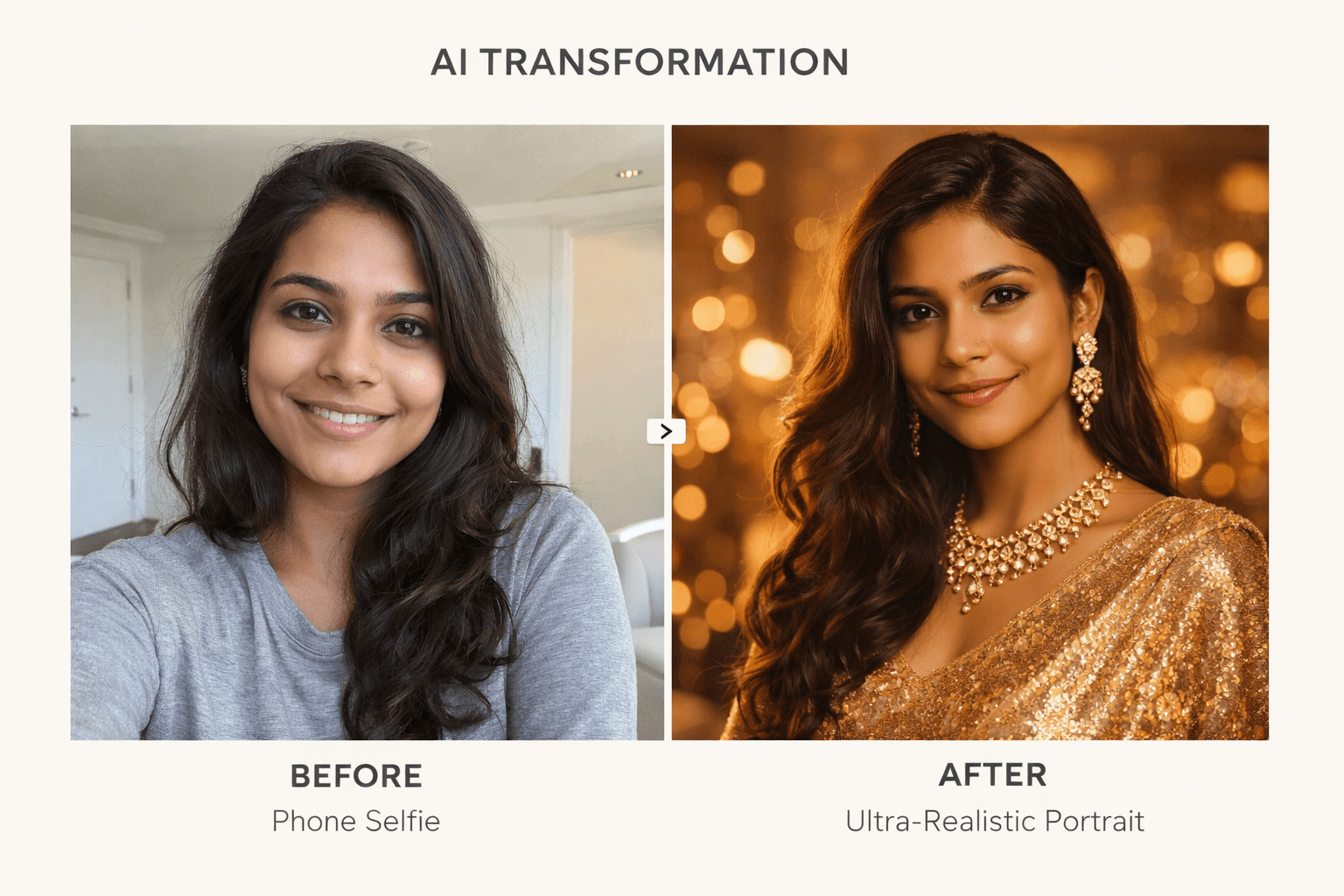
Google Gemini AI Photo Editing Prompts for Girls: Your phone camera is fine. But what if one text prompt could turn that selfie into something that looks like a Vogue shoot? That’s exactly what these Gemini AI prompts do — and girls across India and beyond are using them to create portraits they never thought possible.
TL;DR / Key Takeaways
- Google Gemini AI can transform an ordinary selfie into a cinematic, magazine-quality portrait — using just a text prompt.
- The best results come from prompts that specify lighting, outfit, angle, mood, and lens style together.
- These 10 prompts cover every aesthetic: golden hour, saree elegance, moody editorial, urban street, mountain travel, and more.
- A face-lock control line added to every prompt keeps your facial features intact — no AI-distorted faces.
- You don’t need any design skills, Photoshop, or premium subscriptions — just Gemini and your photo.
What Are Google Gemini AI Photo Editing Prompts, and How Do They Work?
Google Gemini AI photo editing prompts are detailed text instructions you upload alongside your photo inside the Gemini app. They tell the AI how to reinterpret your image — what outfit to place you in, what lighting to apply, what mood to create — while preserving your actual face. The result is a fully rendered, ultra-realistic portrait that can reach 8K HD quality. Unlike Instagram filters, these prompts don’t just adjust colour. They reconstruct the entire scene around you.
The difference between a mediocre Gemini output and a stunning one usually comes down to prompt specificity. Generic prompts produce generic results. Prompts that define lens type, lighting source, pose, background mood, and fabric texture produce images that look like they belong in a campaign.
The secret isn’t the AI — it’s knowing exactly what to ask for.
How to Use These Prompts: The Setup That Gets Results
Before you copy any prompt below, a few setup steps will dramatically improve your output.
Open gemini.google.com or the Gemini app on your phone. Start a new chat and select the image generation or editing mode. Upload a photo where your face is clearly visible, well-lit, and unobstructed. Then paste your chosen prompt — and critically, always add this control line at the end:
“Keep the face exactly as in the reference photo. Maintain natural skin texture. Ultra-realistic 8K HD portrait. No distortion, no extra faces, no watermarks, no text.”
This single addition is what separates AI portraits that look real from ones that look like AI art. If the first output isn’t perfect, refine it — tell Gemini to soften the lighting, adjust the colour tone, or change a detail. Gemini handles iterative feedback well.
Now, here are the 10 prompts worth bookmarking.
The 10 Best Google Gemini AI Photo Editing Prompts for Girls
1. Playful Indoor Studio Portrait
Best for: Profile photos, Instagram DP, cheerful social content
High-quality indoor portrait with warm studio lighting and a modern, softly lit background. The subject wears a beige knitted sweater over a white top, paired with blue jeans. Playful, confident pose — leaning slightly forward, smiling brightly, winking one eye. Both hands form an "OK" gesture, hair tied in a casual ponytail with soft face-framing strands. Cheerful, energetic vibe with realistic skin texture and balanced lighting.This prompt works well for girls who want a clean, approachable look — the kind of portrait you’d expect from a lifestyle brand shoot, not a birthday selfie. The sweater-and-jeans combination keeps it versatile across seasons.
2. Golden Hour Beach Portrait
Best for: Travel content, vacation aesthetic, warm-toned feeds
High-quality portrait of a person sitting on a beach during golden hour with warm, cinematic light. Wearing a black sleeveless tank top and striped pants, seated with one knee raised. One hand gently touches the hair as they look slightly upward to the side with a calm, thoughtful expression. Palm trees, sand, and a clear evening sky with soft gradient tones form the background; hair appears naturally windswept. Relaxed, serene vacation mood with realistic skin texture and smooth cinematic lighting.Golden hour is the most forgiving light in photography, and Gemini replicates it well. The “naturally windswept” instruction is key — it tells the AI to avoid the stiff, artificial hair that often gives away AI-generated portraits.
3. Ice-Blue Saree Elegance
Best for: Wedding season content, traditional looks, festive photos
Ultra-realistic, elegant portrait using the uploaded photo as the exact face reference. The woman wears a sheer ice-blue/silver saree with delicate sequins, beads, fine embroidery, and a matching shimmer blouse. Long soft glossy waves swept to one side, minimal makeup with glowing skin, soft pink lips, and a calm smile. Clean, bright indoor setting with soft white backlight, high-key lighting, and airy refined mood. Shallow depth of field, cinematic softness, DSLR 85mm look, ultra-detailed fabric, and realistic skin tones.The fabric detail instruction — sequins, beads, fine embroidery — is what makes this prompt exceptional. Gemini renders textile details remarkably well when prompted specifically, and the result often looks indistinguishable from a professional saree shoot.
Prompts that describe fabric texture produce portraits that look touchable, not digital.
4. Golden-Beige Saree Studio Portrait
Best for: Sophisticated editorial looks, LinkedIn profiles, formal occasions
High-end studio portrait using the uploaded photo as the exact face reference, with no facial changes. Wearing a smooth satin golden-beige saree paired with a black sleeveless blouse featuring delicate gold embroidery. Seated gracefully with one hand on the chin, calm and confident expression, eyes slightly toward the camera. Warm neutral studio backdrop with elegant green indoor plants, soft diffused lighting and cinematic shadows. DSLR-quality 85mm look, shallow depth of field, ultra-realistic textures, refined editorial fashion aesthetic.The seated pose with a hand on the chin communicates confidence without aggression — a combination that works for professional profiles as much as personal ones. The plant detail in the background adds a contemporary editorial feel that separates this from generic studio portraits.
5. Moody Editorial Outdoor Portrait
Best for: Fashion-forward feeds, magazine aesthetic, artistic portraits
Ultra-realistic cinematic portrait using your uploaded photo as the exact face reference. Natural beauty with a calm, serious expression; soft freckles visible, minimal makeup. Long, loose, dark-brown hair slightly messy and blowing in the wind, wearing a black semi-sheer top with an oversized cardigan slipping off the shoulders. Shot outdoors beneath a concrete structure with moody natural daylight, shallow depth of field, and a softly blurred background. Film-style look with muted earthy tones, sharp eye focus, 85mm f/1.8, realistic skin texture with no retouching.“Realistic skin texture with no retouching” is a line more people should add to their prompts. AI has a tendency to over-smooth skin into a plastic sheen — explicitly requesting the opposite produces a result that looks human rather than rendered.
6. Magical Night Glow Portrait
Best for: Festival season, Diwali posts, ethereal aesthetic content
Cinematic night-time portrait using the uploaded photo as the exact subject reference. Side-profile shot from a slightly low angle, head tilted upward with a calm, reflective expression. Wearing a dark winter jacket with a fur-lined hood, hair softly flowing. Background filled with glowing fairy lights or lanterns, creating dense golden-red bokeh. Very shallow depth of field, warm cinematic tones, glowing highlights, ultra-realistic 4K detail.The dense golden-red bokeh instruction turns the background into something almost painterly — the kind of backdrop that makes a portrait feel like a still from a film rather than a photograph. This prompt performs particularly well for festival and Diwali content.
7. Urban Winter Transit Portrait
Best for: Travel blogs, winter aesthetic, street-style content
Realistic cinematic portrait using your uploaded photo as the exact subject reference. Standing partially inside a tram or train doorway, shot from a slightly low angle, gazing outward with a calm, thoughtful expression. Wearing a dark winter coat with large buttons, a light turtleneck, a dark knit beanie, hands in pockets, and subtle red lipstick. Urban public transport setting with metal frames and glass panels, softly blurred background in cool winter daylight. Shallow depth of field, natural colour grading, realistic skin texture, moody yet elegant 4K street-photography style.The “slightly low angle” instruction changes the entire dynamic of this portrait — it gives the subject an unintentional authority that works well for fashion and travel content creators.
8. Serene Hilltop Lifestyle Portrait
Best for: Travel content, nature aesthetic, wellness and lifestyle niches
Highly realistic outdoor lifestyle portrait using your uploaded photo as the exact subject reference. Standing sideways on a hilltop overlooking a lush green valley, gently lifting hair with eyes closed, and with a peaceful smile. Wearing an oversized red sweatshirt and high-waisted light blue jeans for a relaxed, casual look. Soft mist over forested hills with distant houses, overcast sky, and diffused natural light in muted earthy tones. Medium–full body shot with shallow depth of field, cinematic, serene travel mood, and soft background blur.The mist and overcast sky instruction keeps the lighting realistic and avoids the oversaturated look that often undermines AI landscape portraits. This is one of the more versatile Google Gemini AI photo editing prompts for girls — it works for travel, wellness, and general lifestyle content equally well.
9. Cinematic Mountain Travel Portrait
Best for: Adventure travel, trekking content, outdoor lifestyle feeds
Highly realistic travel portrait using your uploaded photo as the exact subject reference. Standing at a mountain viewpoint with a metal railing, hands in jacket pockets, smiling naturally at the camera. Wearing a black puffer jacket, blue jeans, and a small backpack in a cozy cold-weather outfit. Dramatic alpine landscape with rocky peaks, snow patches, glacier valley, and dense conifer trees under misty clouds. Medium-wide shot, diffused natural light, cool muted tones, crisp details, cinematic travel aesthetic.The specific alpine details — rocky peaks, snow patches, glacier valley, conifers — give Gemini a clear visual vocabulary to work with. Vague instructions like “mountain background” produce generic results; this level of specificity produces something that looks like a real shoot in Himachal or Uttarakhand.
10. Urban Candid Street Portrait
Best for: Everyday content, street style, authentic-feeling personal branding
Ultra-realistic candid street portrait using your uploaded photo as the exact subject reference. Standing on a city sidewalk beside a modern building, captured at eye level with a calm, natural, closed-lip smile. Wearing a black leather shearling jacket with white fleece lining over a patterned shirt, casual urban styling. Cool daylight with soft shadows, shoulder-length dark hair worn loose, natural makeup, and realistic skin texture. Street-style editorial look with a 50mm f/2.0 feel, softly blurred city background, and authentic documentary mood.The “closed-lip smile” is a small detail with a large impact. Open-mouth smiles are harder for AI to render convincingly without producing uncanny results. A natural, closed-lip expression consistently yields more photorealistic output.
Why Prompt Structure Matters More Than the AI Model
“The gap between what AI can do and what most people get from it is almost entirely explained by how they ask.” — Ethan Mollick, Wharton Professor and author of Co-Intelligence: Living and Working with AI (Penguin, 2024)
Mollick’s observation about AI prompting applies directly here. Google Gemini’s image editing capabilities in 2026 are genuinely impressive — capable of preserving facial identity while reconstructing an entire scene around a person. But the model only performs at that level when the prompt gives it enough information to work with.
Every prompt in this list includes at minimum: an outfit description, a lighting instruction, a background specification, a mood direction, and a technical camera reference (lens type, aperture, shot angle). That combination is what produces an 8K-quality output rather than a competent but forgettable AI edit.
According to Google’s own documentation on Gemini image generation, the model responds best to prompts that combine subject detail, environment context, and photographic style — which is exactly the architecture each prompt above follows.
The Prompt Is Only the Beginning
The prompts above aren’t templates to use once and forget. They’re starting points. Gemini handles refinement well — if the lighting isn’t quite right, you can ask for it softer. If the background feels too busy, you can simplify it with a follow-up instruction. The best AI portrait sessions work like a conversation with a skilled photographer: you describe what you want, review the result, and refine until it’s exactly right.
What’s changed in 2026 is that this kind of creative control — once exclusive to people with access to professional studios, photographers, and editing suites — now lives in a text box anyone can open on their phone. The camera you have is enough. The only question is what you tell the AI to do with it.
Which of these prompts are you trying first? Drop the aesthetic you’re going for in the comments — golden hour beach, saree elegance, or moody editorial — and share your results. If you found this useful, pass it along to a friend who’s been wondering why their Gemini edits don’t look as good as the ones they’ve seen online.
FAQ
Can Google Gemini edit my actual photo or does it generate a new one?
Gemini uses your uploaded photo as a face reference and generates a new image based on your prompt, incorporating your facial features into the new scene. It doesn’t edit pixels in your original photo the way Photoshop does — it reconstructs the image with your face at the centre.
Will my face look accurate in Gemini AI portraits?
It depends on the prompt. Adding a face-lock instruction — “Keep the face exactly as in the reference photo, no facial changes” — significantly improves likeness retention. Without this, Gemini may blend your features with its own trained aesthetics.
Do I need a paid Gemini subscription for these prompts?
Basic Gemini image generation is available on the free tier, but Gemini Advanced (part of Google One AI Premium) gives you access to higher-resolution outputs and better instruction-following. For 8K HD results, Advanced is worth the upgrade.
Why does my Gemini output sometimes look AI-generated and unnatural?
The most common culprits are: over-smoothed skin (fix: add “realistic skin texture, no retouching”), stiff hair (fix: add “naturally windswept” or “loose and organic”), and plastic-looking eyes (fix: add “sharp expressive eyes with natural catchlights”). Specific language produces specific results.
Can I use these prompts for Saree portraits even if I don’t have a saree photo?
Yes. Prompts 3 and 4 are specifically designed for this — you upload any clear photo and the prompt instructs Gemini to place you in a saree. This is one of the most popular use cases, especially ahead of weddings and festivals.
Are these Gemini prompts safe to use?
Yes. All prompts in this list are designed for portrait photography — no harmful, explicit, or identity-manipulative content. Gemini’s own content policies also filter outputs to prevent misuse.